להתקנת מחשב חלונות חדש

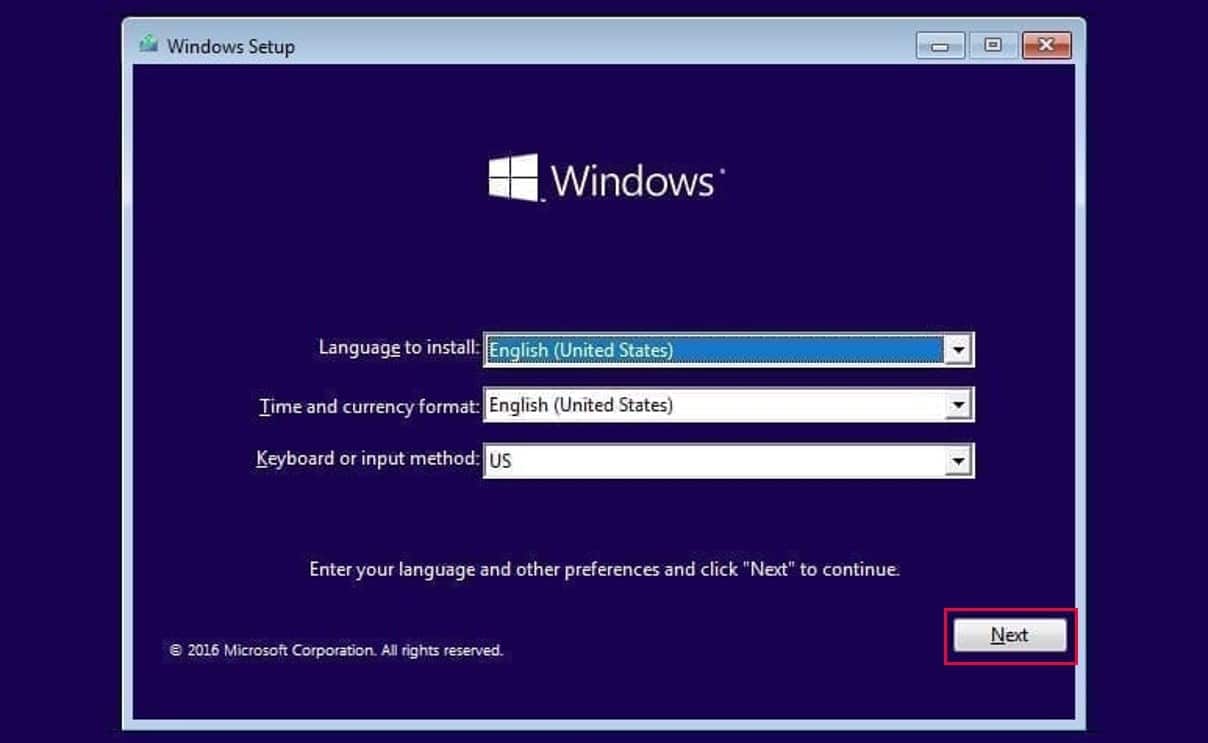
הדרכים החשובים להקנה של חלונות 10 \ 11 ממחשב קיים
הורדת חלונות 10 / 11
גישה להכנת הקובץ להתקנה החדש:
How To Setup Windows
הכנה של קובץ נקי להתקנת חלונות ” עם כל ההגדרות שלי ” ביצוע ניקוי לחלונות / לעקוף בהתקנה את הרישום של מוקרוסופט GitHub - ChrisTitusTech/winutil: Chris Titus Tech’s Windows Utility - Install Programs, Tweaks, Fixes, and UpdatesChris Titus Tech’s Windows Utility - Install Programs, Tweaks, Fixes, and Updates - ChrisTitusTech/
 nigi
nigi
GitHub - ChrisTitusTech/winutil at blog.nigi.pro
Chris Titus Tech’s Windows Utility - Install Programs, Tweaks, Fixes, and Updates - GitHub - ChrisTitusTech/winutil at blog.nigi.pro
 ChrisTitusTech
💡
irm "https://christitus.com/win" | iex
Open PowerShell (Not CMD). To do that, right-click on the Windows start menu and select PowerShell or Terminal.
💡
irm https://get.activated.win | iexשדרוג חלונות 10 לחלונות 11 (כולל תמיכה בחומרה ישנה - מחשבים ישנים)
Releases · builtbybel/Flyoobe
Fly through your Windows 11 setup 🐝. Contribute to builtbybel/Flyoobe development by creating an account on GitHub.
builtbybelהורדה ישירה לקבצים:
גישה להתקנת הפיצוח של האופיס:
https://blog.nigi.pro/pytsvkh-khlvnvt-vvpys/
פיצוח חלונות ואופיס
התקנה של אופיס office2021-engoffice2021-eng.zip3 MBdownload-circleoffice2021-heboffice2021-heb.zip3 MBdownload-circleoffice365-engoffice365-eng.zip3 MBdownload-circleoffice365-heboffice365-heb.zip3 MBdownload-circleoffice2019-heboffice2019-heb.zip3 MBdownload-circleOffice Activation Command by OmmanOffice Activation Command by Omman. GitHub Gist: instantly share code, notes, and snippets.Gist262588213843476 פיצוח אופיס 365 office-365office-365.cmd3 KBdownload-circle Windows & Office Activat
nigi
דרך נוספת לפיצוח את האופיס
💡
cd /d %ProgramFiles(x86)%\Microsoft Office\Office16
cd /d %ProgramFiles%\Microsoft Office\Office16💡
for /f %x in ('dir /b ..\root\Licenses16\ProPlus2021VL_KMS*.xrm-ms') do cscript ospp.vbs /inslic:"..\root\Licenses16\%x"Activate your Office using the KMS key
💡
cscript ospp.vbs /setprt:1688
cscript ospp.vbs /unpkey:6F7TH >nul
cscript ospp.vbs /inpkey:FXYTK-NJJ8C-GB6DW-3DYQT-6F7TH
cscript ospp.vbs /sethst:e8.us.to
cscript ospp.vbs /unpkey:6F7TH >nul
cscript ospp.vbs /inpkey:FXYTK-NJJ8C-GB6DW-3DYQT-6F7TH
cscript ospp.vbs /sethst:e8.us.to
cscript ospp.vbs /actHere is all the text you will get in the command prompt window
הכנה של קובץ run.cmd
💡
C:\Windows\system32>cd /d %ProgramFiles(x86)%\Microsoft Office\Office16
The system cannot find the path specified.
C:\Windows\system32>cd /d %ProgramFiles%\Microsoft Office\Office16
C:\Program Files\Microsoft Office\Office16>for /f %x in ('dir /b ..\root\Licenses16\ProPlus2021VL_KMS*.xrm-ms') do cscript ospp.vbs /inslic:"..\root\Licenses16\%x"
C:\Program Files\Microsoft Office\Office16>cscript ospp.vbs /inslic:"..\root\Licenses16\ProPlus2021VL_KMS_Client_AE-ppd.xrm-ms"
Microsoft (R) Windows Script Host Version 5.812
Copyright (C) Microsoft Corporation. All rights reserved.
---Processing--------------------------
---------------------------------------
Installing Office license: ..\root\licenses16\proplus2021vl_kms_client_ae-ppd.xrm-ms
Office license installed successfully.
---------------------------------------
---Exiting-----------------------------
C:\Program Files\Microsoft Office\Office16>cscript ospp.vbs /inslic:"..\root\Licenses16\ProPlus2021VL_KMS_Client_AE-ul-oob.xrm-ms"
Microsoft (R) Windows Script Host Version 5.812
Copyright (C) Microsoft Corporation. All rights reserved.
---Processing--------------------------
---------------------------------------
Installing Office license: ..\root\licenses16\proplus2021vl_kms_client_ae-ul-oob.xrm-ms
Office license installed successfully.
---------------------------------------
---Exiting-----------------------------
C:\Program Files\Microsoft Office\Office16>cscript ospp.vbs /inslic:"..\root\Licenses16\ProPlus2021VL_KMS_Client_AE-ul.xrm-ms"
Microsoft (R) Windows Script Host Version 5.812
Copyright (C) Microsoft Corporation. All rights reserved.
---Processing--------------------------
---------------------------------------
Installing Office license: ..\root\licenses16\proplus2021vl_kms_client_ae-ul.xrm-ms
Office license installed successfully.
---------------------------------------
---Exiting-----------------------------
C:\Program Files\Microsoft Office\Office16>cscript ospp.vbs /setprt:1688
Microsoft (R) Windows Script Host Version 5.812
Copyright (C) Microsoft Corporation. All rights reserved.
---Processing--------------------------
---------------------------------------
Successfully applied setting.
---------------------------------------
---Exiting-----------------------------
C:\Program Files\Microsoft Office\Office16>cscript ospp.vbs /unpkey:6F7TH >nul
C:\Program Files\Microsoft Office\Office16>cscript ospp.vbs /inpkey:FXYTK-NJJ8C-GB6DW-3DYQT-6F7TH
Microsoft (R) Windows Script Host Version 5.812
Copyright (C) Microsoft Corporation. All rights reserved.
---Processing--------------------------
---------------------------------------
<Product key installation successful>
---------------------------------------
---Exiting-----------------------------
C:\Program Files\Microsoft Office\Office16>cscript ospp.vbs /sethst:e8.us.to
Microsoft (R) Windows Script Host Version 5.812
Copyright (C) Microsoft Corporation. All rights reserved.
---Processing--------------------------
---------------------------------------
Successfully applied setting.
---------------------------------------
---Exiting-----------------------------
C:\Program Files\Microsoft Office\Office16>cscript ospp.vbs /act
Microsoft (R) Windows Script Host Version 5.812
Copyright (C) Microsoft Corporation. All rights reserved.
---Processing--------------------------
---------------------------------------
Installed product key detected - attempting to activate the following product:
SKU ID: cd18ecc0-466a-45d4-8d2e-8c4fa48ae591
LICENSE NAME: Office 21, Office21ProPlus2021R_Grace edition
LICENSE DESCRIPTION: Office 21, RETAIL(Grace) channel
Last 5 characters of installed product key: PG343
ERROR CODE: 0xC004F017
ERROR DESCRIPTION: The Software Licensing Service reported that the license is not installed.
---------------------------------------
Installed product key detected - attempting to activate the following product:
SKU ID: fbdb3e18-a8ef-4fb3-9183-dffd60bd0984
LICENSE NAME: Office 21, Office21ProPlus2021VL_KMS_Client_AE edition
LICENSE DESCRIPTION: Office 21, VOLUME_KMSCLIENT channel
Last 5 characters of installed product key: 6F7TH
<Product activation successful>
---------------------------------------
---------------------------------------
---Exiting-----------------------------
The system cannot find the path specified.
C:\Windows\system32>cd /d %ProgramFiles%\Microsoft Office\Office16
C:\Program Files\Microsoft Office\Office16>for /f %x in ('dir /b ..\root\Licenses16\ProPlus2021VL_KMS*.xrm-ms') do cscript ospp.vbs /inslic:"..\root\Licenses16\%x"
C:\Program Files\Microsoft Office\Office16>cscript ospp.vbs /inslic:"..\root\Licenses16\ProPlus2021VL_KMS_Client_AE-ppd.xrm-ms"
Microsoft (R) Windows Script Host Version 5.812
Copyright (C) Microsoft Corporation. All rights reserved.
---Processing--------------------------
---------------------------------------
Installing Office license: ..\root\licenses16\proplus2021vl_kms_client_ae-ppd.xrm-ms
Office license installed successfully.
---------------------------------------
---Exiting-----------------------------
C:\Program Files\Microsoft Office\Office16>cscript ospp.vbs /inslic:"..\root\Licenses16\ProPlus2021VL_KMS_Client_AE-ul-oob.xrm-ms"
Microsoft (R) Windows Script Host Version 5.812
Copyright (C) Microsoft Corporation. All rights reserved.
---Processing--------------------------
---------------------------------------
Installing Office license: ..\root\licenses16\proplus2021vl_kms_client_ae-ul-oob.xrm-ms
Office license installed successfully.
---------------------------------------
---Exiting-----------------------------
C:\Program Files\Microsoft Office\Office16>cscript ospp.vbs /inslic:"..\root\Licenses16\ProPlus2021VL_KMS_Client_AE-ul.xrm-ms"
Microsoft (R) Windows Script Host Version 5.812
Copyright (C) Microsoft Corporation. All rights reserved.
---Processing--------------------------
---------------------------------------
Installing Office license: ..\root\licenses16\proplus2021vl_kms_client_ae-ul.xrm-ms
Office license installed successfully.
---------------------------------------
---Exiting-----------------------------
C:\Program Files\Microsoft Office\Office16>cscript ospp.vbs /setprt:1688
Microsoft (R) Windows Script Host Version 5.812
Copyright (C) Microsoft Corporation. All rights reserved.
---Processing--------------------------
---------------------------------------
Successfully applied setting.
---------------------------------------
---Exiting-----------------------------
C:\Program Files\Microsoft Office\Office16>cscript ospp.vbs /unpkey:6F7TH >nul
C:\Program Files\Microsoft Office\Office16>cscript ospp.vbs /inpkey:FXYTK-NJJ8C-GB6DW-3DYQT-6F7TH
Microsoft (R) Windows Script Host Version 5.812
Copyright (C) Microsoft Corporation. All rights reserved.
---Processing--------------------------
---------------------------------------
<Product key installation successful>
---------------------------------------
---Exiting-----------------------------
C:\Program Files\Microsoft Office\Office16>cscript ospp.vbs /sethst:e8.us.to
Microsoft (R) Windows Script Host Version 5.812
Copyright (C) Microsoft Corporation. All rights reserved.
---Processing--------------------------
---------------------------------------
Successfully applied setting.
---------------------------------------
---Exiting-----------------------------
C:\Program Files\Microsoft Office\Office16>cscript ospp.vbs /act
Microsoft (R) Windows Script Host Version 5.812
Copyright (C) Microsoft Corporation. All rights reserved.
---Processing--------------------------
---------------------------------------
Installed product key detected - attempting to activate the following product:
SKU ID: cd18ecc0-466a-45d4-8d2e-8c4fa48ae591
LICENSE NAME: Office 21, Office21ProPlus2021R_Grace edition
LICENSE DESCRIPTION: Office 21, RETAIL(Grace) channel
Last 5 characters of installed product key: PG343
ERROR CODE: 0xC004F017
ERROR DESCRIPTION: The Software Licensing Service reported that the license is not installed.
---------------------------------------
Installed product key detected - attempting to activate the following product:
SKU ID: fbdb3e18-a8ef-4fb3-9183-dffd60bd0984
LICENSE NAME: Office 21, Office21ProPlus2021VL_KMS_Client_AE edition
LICENSE DESCRIPTION: Office 21, VOLUME_KMSCLIENT channel
Last 5 characters of installed product key: 6F7TH
<Product activation successful>
---------------------------------------
---------------------------------------
---Exiting-----------------------------
C:\Program Files\Microsoft Office\Office16>פיצוח החלונות
| Windows 10 Pro | RHGJR-N7FVY-Q3B8F-KBQ6V-46YP4 |
slmgr /ipk W269N-WFGWX-YVC9B-4J6C9-T83GXslmgr /ipk RHGJR-N7FVY-Q3B8F-KBQ6V-46YP4
| Windows 11 Pro | VK7JG-NPHTM-C97JM-9MPGT-3V66T |
slmgr /ipk VK7JG-NPHTM-C97JM-9MPGT-3V66T
slmgr /ipk W269N-WFGWX-YVC9B-4J6C9-T83GX
ואז להכניס את 2 הפרמטרים הבאים
slmgr /skms kms8.msguides.comslmgr /atoבמידה ויש צורך לעקוף את הרישום של מקרוסופט:
Shift + F10
start ms-cxh:localonly
או להקליד
bypassnro
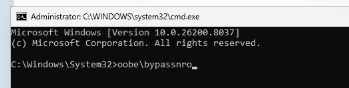
אפשרות לשמור את כל הדרייברים במחשב ולטעון אותם בהתקנה החדשה במחשב:
יש להריץ את הפקודה הזאת בטרמינל ולהריץ כמנהל:
dism /online /export-driver /destination:D:\Drivers
( D:\Drivers זה מיקום של הספריה בדיסק און קי)
יש לשנות את זהז למיקוק של הכונן שלך.